Other websites describe this better
than this site. In fact have a look before
reading the following.
The axTLS
project is an SSL client/server library using TLS 1.0/1.1/1.2. The
specific bits are in the axTLS/ssl directory and a
description of the API is here.
It also
includes a web server called axhttpd
(based originally on awhttpd). It also works on
other web servers such as mini_httpd (with
the openssl API feature enabled and some
minor makefile changes).
But the
axTLS API is designed to be used in any
web-server or TCP/IP application. It doesn't
even need to use sockets - serial interfaces
are supported as well. It was designed to be
as small and simple as possible without
compromising on security.
How
do I build it?
GNU make,
and Perl are required for building -
including Win32 and Solaris platforms. This
requires installing Cygwin on Win32 platforms -
it just makes life easier (for me at least).
Tools such as gcc, make, Perl and Swig are
required (I use the X-Window framework in
development as well).
The build
mechanism uses mconf which is tool
similar to that used with BusyBox and the
Linux kernel. Typing:
>
make menuconfig
will show a
window similar to the following:

All of the
axTLS options have help descriptions
associated with them (which are viewed by
hitting the "Help" option).
To run it,
go to the _stage directory and run the
various executables (LD_LIBRARY_PATH
may have to be set to this directory).
Alternatively compile with "make
install" and run from any directory.
There are
five build modes that affect the build size
(library sizes from a 32 bit Linux FC3
system) -
 |
Basic SSL
server mode |
The
simplest version with no client
functionality. It results in a library
about 45kB in size. Use this mode if you
are doing standard SSL server work.
|
SSL Server
mode with client verification |
If
client authentication is required. It
results in a library about 49kB in size.
Use this mode if you have an SSL server
which requires client authentication
(which is uncommon in browser
applications).
|
SSL
Client/Server |
Client
functionality has been added. It results
in a library about 51kB in size.
Use this mode if you require axTLS to use
SSL client functionality (the SSL server
code is always enabled).
|
SSL
Client/Server with diagnostics. |
The same
as client/server but with many text
strings added for diagnosing issues. It
results in a library about 58kB in size.
It is suggested that this mode is used
only during development, or for systems
that have more generous memory
limitations.
|
Skeleton
SSL mode |
A
special version which removes much of the
functionality and sacrifices speed to
produce the smallest possible library
(around 37kB in size).
To set the
build mode, go to mconf->SSL Library->Mode and pick one of the
above.
Other
factors affecting library size include using
the default key/certificate, enabling
PEM or enabling PKCS#12.
Note: Server
functionality is always enabled. Adding extra
language bindings does not result in any
significant library size changes.
An SSL handshake is
expensive and consists of several steps. And
many typical browser operations close the
client connection after each page access, so
the handshake must be performed for every new
page.
Session resumption
allows cipher key details from a previous
session to be used again. This bypasses some
of the more expensive SSL operations (like
the client key exchange step). It's worth it
for any embedded system, just due to this
fact.
The one negative for
session resumption is that the cipher keys
are used for much longer (around 1 day - but
this is compile-time configurable - see mconf->SSL Library->Session expiry time) and
so are more susceptible to attack. axTLS
supports session renegotiation as well.
All build modes
except skeleton mode support session
resumption, and the number of sessions that
are cached is run-time configurable.
As large a
key as possible. But...
RSA
decryption is CPU expensive. Period. It is by
far the most CPU intensive operation in the
SSL handshake, and a doubling of key size
will blow out the decrypt time. This was one
of the key motivations for implementing
session resumption. If it is enabled, then
the decryption operation is only done once
(or twice on IE6 if a certificate has to be
accepted). Otherwise this operation is done
every time a new HTTP page is accessed.
Here are
some times taken from my AMD 3400+ (on 32 bit
FC3 Linux):
| Key
Size |
Time
(ms) |
| 512 |
5 |
| 1024 |
12 |
| 2048 |
54 |
| 4096 |
367 |
It is widely
accepted that a 1024 bit key is ok (512 bit
keys have had issues in the past). An
embedded system is likely to be a factor of
20 or more times slower, so expect a
decryption time of at least 200ms for a 1024
bit key for each connecting client.
I've spent a
lot of time (too much!) trying to make these
figures as small as possible (see the blog for more notes).
Asymmetric
encryption over SSL requires a private key,
and a certificate (which contains the public
key). These both need to be generated, and
there is a procedure in which to do this.
Typically the sequence would go like (using
the openssl mechanism):
generate the private key (a 1024 bit key is used in this example)
> openssl genrsa -out my_private_key.pem 1024
convert the private key into DER format
> openssl rsa -in ./my_private_key.pem -out ./my_private_key -outform DER
generate the certificate request using the previously generated private key
> openssl req -new -key my_private_key.pem -out my_cert_req.pem
You'll be
asked for a things like
country/state/city/organisation etc. Just
make sure your Fully Qualified
Domain Name is the "common
name". You will have have to send this
off to a CA like Verisign or Thawte for signing. The CA
will eventually give you a certificate in PEM
format (put this into my_cert.pem).
convert the certificate into DER format
> openssl x509 -in my_cert.pem -out my_cert -outform DER
And now you
have a certificate ready for use. However
there are a couple of problems with this
technique:
|
The
certificate will eventually expire
(typically after a year). |
|
The cost of
signing can be several hundred
dollars per year. |
|
The common
name will be unique for every device,
and so a certificate will should be
generated for each device. |
Certificate
chaining (which axTLS supports) whereby a
single CA signed certificate can be used to
sign an unlimited number of certificates can
also be used, but again the issues of
certificate expiry and the common name still
exist.
The solution
is a self signed certificate. If the user is
prepared to put up with a notice such as:
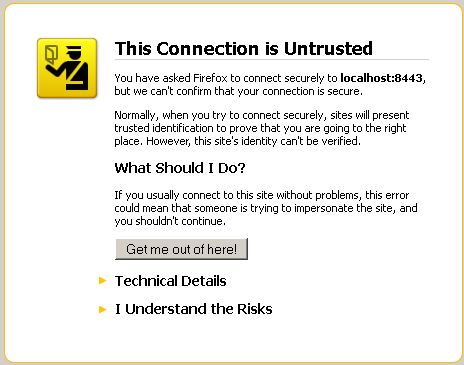
- then a
self-signed certificate should be ok, and can
be generated as follows:
>
openssl req -new -x509 -key
./my_private_key.pem -out my_cert_req.cer
-days 12000 -outform DER
Now there
should be two DER encoded files (regardless
of the technique used) - the certificate and
the private key. Use xxd (a vim utility) to
generate the C code.
> xxd -i my_cert | sed -e "s/my_cert/default_cert/" > <axTLS>/cert.h (where <axTLS> is the /axTLS/ssl directory)
> xxd -i my_private_key | sed -e "s/my_private_key/default_private_key/" > <axTLS>/private_key.h
You should
then delete the private key files to remove
any trace of them. Simply recompile axTLS and
the new certificate should be active.
axTLS also
understands the PEM format, however this is a
representation of the DER format anyway
(using base64 encoding + header/footer
information).
There is an
online certificate generator here and another one here which can be used to
generate self-signed certificates and keys
(which may also be used to generate the
private key for the internal certificate
generator).
How
do I use the internal certificate generator?
The problem
with the above technique is that you will get
nasty messages from the browser such as:
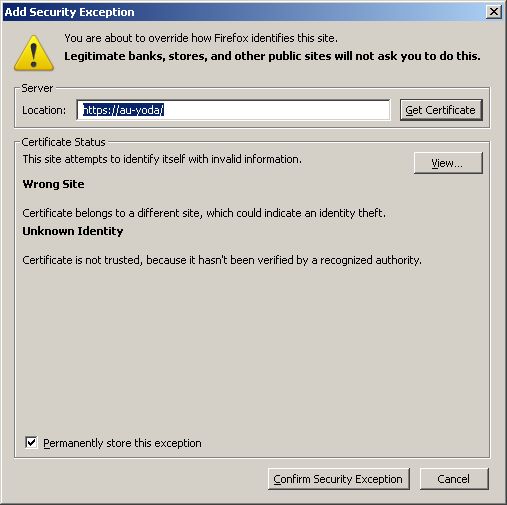
This is due
to a mismatch between the common name in the
certificate, and the server name in the URL
(of which the Fully Qualified
Domain Name is one part). One
fix is to automatically generate the
certificate based on the host/domain names.
In this scenario, only the private/public
keys need to be pre-calculated (not an axTLS
feature yet) - see the previous section for
generating the private/public keys.
So now there
are now 3 different ways of loading private
keys/certificates:
|
The
key/certificate are stored in private_key.h/cert.h
respectively. This has the advantage
of not requiring a file system and is
fast to load, pulus is a little more
secure in that the private key is
compiled in (with no public
visibility). This is enabled with mconf->SSL Library->Enable
default key. |
|
The
key/certificate are stored in
separate files. If this is the normal
option, then mconf->SSL Library->Enable
default key must be disabled. |
To
access these files automatically, you can
set mconf->SSL Library->Private key
file location (as well as mconf->SSL Library->Private
key password) and mconf->SSL Library->X.509
certificate file location.
Alternatively they can be loaded
programmatically.
|
The X.509
certificate can be automatically
generated by working out the Fully
Qualified Domain Name as the
common name. Alternatively the
various distinguished names can be
configured via mconf. This makes an
embedded SSL solution far simpler at
the cost of around 5kB of code and a
slight start-up time penalty. To use
this feature select mconf->SSL Library->Generate X.509
Certificate. The private key can
be the default, or loaded as a file
(so using either of the first two
techniques). |
Each of these methods
is compile time configurable, and some of the
above features will appear or disappear
depending on the options chosen.
Why
doesn't my standard PKCS#12 file work?
Most
standard PKCS#12 files are encoded with
RC2-40 (a very weak cipher) and 3DES which
are unsupported ciphers in axTLS. openssl's
pkcs12 command requires the "-keypbe
PBE-SHA1-RC4-128 -certpbe PBE-SHA1-RC4-128" option to be
specified when generating the PKCS#12 key.
Microsoft's
tools (such as pvk2pfx) don't support the
above, so using openssl is the only option at
present.
BTW, axTLS's
implementation was reverse engineered from
openssl PKCS#12 certificates. The PKCS#12
standard is ridiculously difficult to
understand - see http://www.cs.auckland.ac.nz/~pgut001/pubs/pfx.html for a rant on it.
The axTLS
test harness used the following sequence (as
an example):
>
openssl pkcs12 -export -in
axTLS.x509_1024.pem -inkey axTLS.key_1024.pem
-keypbe PBE-SHA1-RC4-128 -certpbe
PBE-SHA1-RC4-128 -name
"p12_withoutCA" -out
axTLS.withoutCA.p12 -password pass:abcd
PKCS#8 is
basically in the same situation. See ssl/p12.c for details.
If in doubt,
point dumpasn1 (and its associated config file) at the file
and see what comes out.
What is
Lua?
Lua is a
very cool scripting language that is finding
support in embedded applications due to its
small footprint and fast speed. Lua Pages is
the ability to embed Lua scripts inside html
pages.
This feature
is enabled in mconf->Axhttpd
Configuration->CGI->Enable CGI (and
then ->Enable LUA).
Ensure the the file extensions are
".lua" and ".lp".
See here for more details.
|




